Amazon Self-Ship Integration with Eshopbox
Amazon offers multiple fulfilment models for sellers based on their operational requirements and business setup. The three fulfilment models supported by Amazon are:
- Amazon FBA
- Easy Ship
- Self Ship
This article specifically covers the Amazon Self Ship integration with Eshopbox.
In the Self Ship Integration:
- Inventory is managed by the seller
- Order shipping and courier allocation are managed through Eshopbox
This integration helps sellers process Amazon Self Ship orders through Eshopbox for shipping operations. If the seller wants Eshopbox to manage inventory and shipping both, you refer this Help article - Configure Amazon with Eshopbox
Before You Start
Make sure the following prerequisites are completed before configuring the integration:
- You have an active Amazon Seller Central account
- You have an active Eshopbox workspace
- You have a Self Fulfilment location configured in Eshopbox
Note: This is a mandatory step. Skipping it may lead to operational issues and discrepancies during order processing.
Steps to Set Up Amazon Self Ship Integration with Eshopbox
Step 1: Install the Amazon Self Ship App
To start the integration, you first need to install the Amazon Self Ship app in Eshopbox.
Installing the app allows Eshopbox to connect with your Amazon Seller Central account and access order-related information required for shipping operations.
Follow these steps:
Step 1.1 -Log in to your Eshopbox workspace.
Step 1.2 - From the top navigation bar, go to Apps.
Step 1.3 - Search for and open the Amazon Self Ship app.
Step 2: Connect Your Amazon Seller Account
In this step, you will authorize Eshopbox to access your Amazon Seller Central account.
This authorization allows Eshopbox to:
- Access Amazon Self Ship orders
- Sync cancellations and returns
- Process shipping operations
Follow these steps:
Step 2.1 - Click on the Connect button inside the Amazon Self Ship app.
Step 2.2 - You will be redirected to the Amazon Seller Central login page. Enter your Amazon Seller Central credentials.
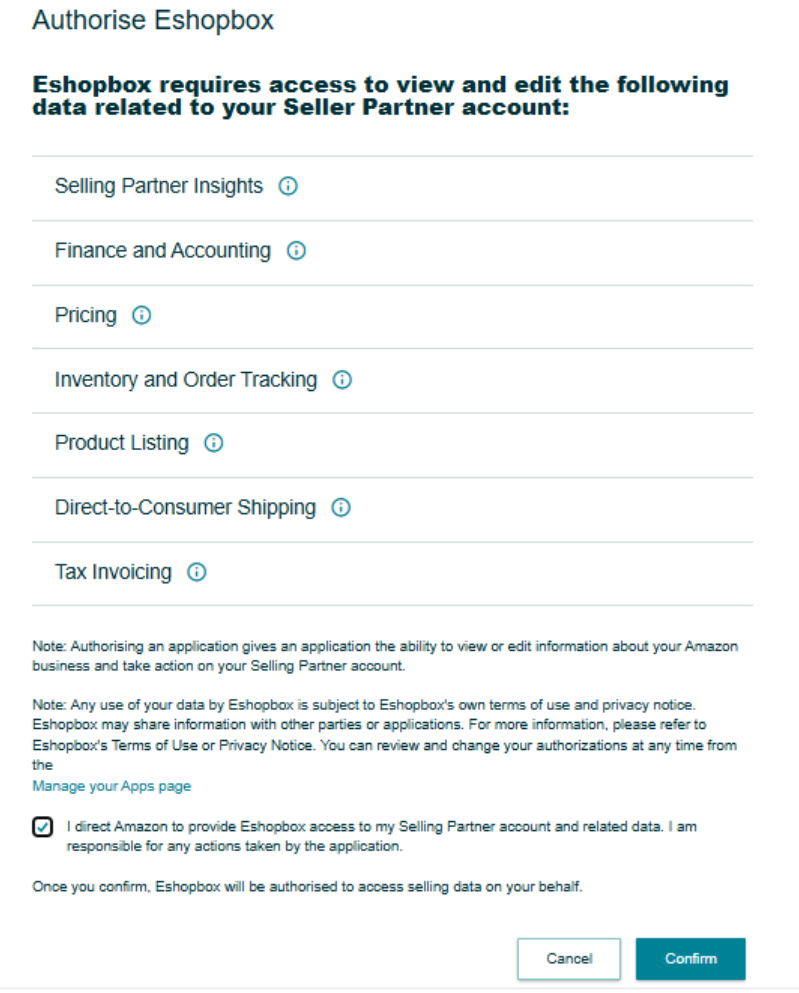
Step 2.4 - Once authorization is completed, you will be redirected back to Eshopbox and the connection setup will be marked as successful.
Step 3: Configure Your Fulfilment Locations
You need to configure your fulfilment locations so that Eshopbox can correctly allocate shipping for Amazon Self Ship orders.
Before proceeding, ensure that a Self Fulfilment location is already created in Eshopbox.
If you have not created one yet, refer to: How to add location?
Follow these steps:
Step 3.1 - Navigate to the My Locations tab inside the Amazon Self Ship app.
Enable your Self Fulfilment location.
Step 3.2 - In the Amazon Location ID field, enter: DEFAULT and Click on Save.
This configuration allows Eshopbox to map your Amazon Self Ship orders with the configured fulfilment location.
Step 4: Make Your Products Available to Amazon
You can skip this step for now and click Next.
Product availability management for the Amazon Self Ship model is linked with inventory management functionality, which is currently not live and is planned for a future release.
Step 5: Configure Automation
The final step is configuring automation settings for order and return processing.
These automations help ensure smooth synchronization between Amazon Seller Central and Eshopbox.
Create Order
This automation imports Amazon Self Ship orders into Eshopbox for shipping and courier allocation.
You can configure:
- The date from which orders should start syncing into Eshopbox
Once enabled:
- New eligible orders from Amazon will automatically start appearing in Eshopbox
Cancel Order
This automation syncs order cancellations from Amazon to Eshopbox.
Once enabled:
- If an order is cancelled on Amazon Seller Central, the same cancellation status will reflect in Eshopbox
Import Return
This automation syncs return updates from Amazon to Eshopbox.
Once enabled:
- Orders marked as returned in Amazon Seller Central will also be updated as returned in Eshopbox
Save Configuration
After configuring all required automation settings:
- Click on OK
- Your Amazon Self Ship integration setup will be completed successfully
Summary
With Amazon Self Ship integration:
- Amazon Self Ship orders are synced into Eshopbox
- Eshopbox manages shipping and courier allocation
- Order cancellations and returns remain synchronized
- Sellers can manage shipping operations centrally through Eshopbox